
OpenStreetMap is one of the most valuable community projects on the internet. It is a free and open map of the world, built by people who care enough to add roads, places, and local knowledge that might otherwise remain missing. In many parts of Ethiopia, and also in many other countries, mapping work still has a huge impact. Every contribution helps make the map more useful for residents, visitors, researchers, humanitarian work, and local businesses.
One very practical way to support OpenStreetMap is by contributing street-level imagery through Mapillary. Mapillary allows people to capture photos from the road and upload them so that mappers can use them to improve the map. This is especially helpful for checking street names, road conditions, intersections, traffic signs, business names, and other details that are difficult to map accurately from satellite imagery alone. Because this kind of imagery can support the wider mapping community, it is a powerful way to help others contribute better data to OpenStreetMap.
I found that recording Mapillary imagery in Ethiopia is surprisingly easy with the BYD B2, and I believe the same approach may also work in other parts of the world. It will probably also work on other BYD models, as long as they have a built-in Android-based infotainment system and a dashcam that the Mapillary app can access.
What makes the BYD B2 especially convenient is its built-in Android system. Instead of relying only on a phone, you can install the Mapillary app directly on the car dashboard. To do that, open the Aptoide app store in the car, search for the Mapillary app, and install it. If you do not already have a Mapillary account, you will need to create one first on Mapillary.com. After that, you can start the app directly from the car’s screen, and in our test setup it connected to the dashcam without much difficulty.
There is one important issue that people should know about from the beginning: recording does not work in portrait mode. If the app opens in portrait mode, you will not be able to record properly. You always have to change the screen orientation back to landscape mode before starting a recording. In our experience, this is necessary every time the app starts in portrait mode. Only landscape mode works correctly for recording.
If your car does not have its own SIM card or mobile data connection, it is also a good idea to connect the infotainment system to your phone’s Wi-Fi hotspot. That can help with connectivity, GPS-related behavior, and especially with uploading your imagery afterward.
Once you finish recording, you can upload the imagery directly from the car to Mapillary. The files are stored on the internal Android system. On the BYD B2 we tested, the infotainment system had 64 GB of storage, which is enough for several days of recording before storage becomes a problem, especially if you upload regularly.
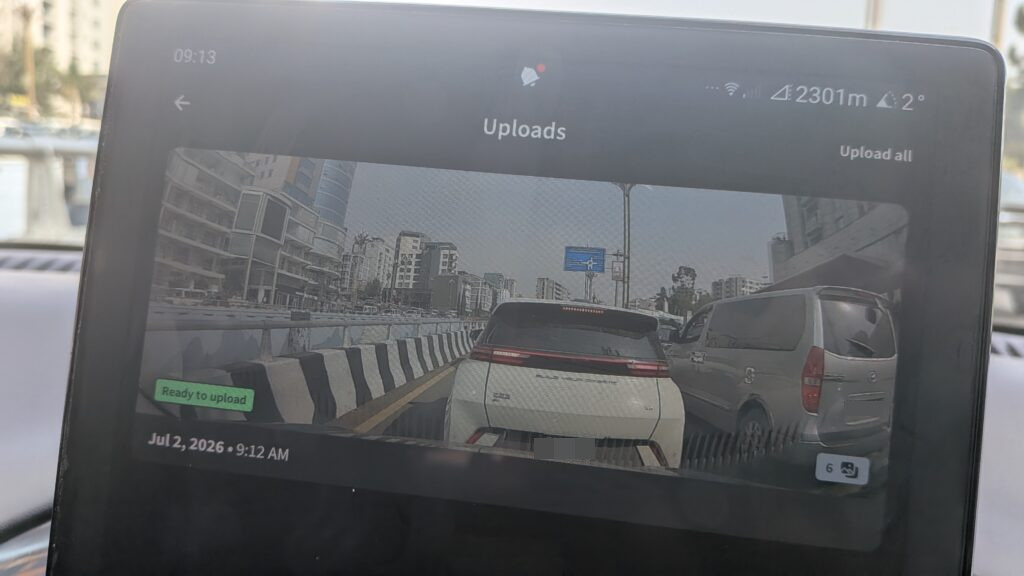
The quality of the dashcam is quite usable for mapillary, check it out.
For me, this makes the BYD B2 a very practical tool for community mapping. This setup lowers the barrier to collecting street-level imagery and makes it easier to contribute while simply driving around. That is useful not only in Ethiopia, but potentially anywhere this kind of BYD setup is available. If other BYD cars use a similar Android system and dashcam integration, there is a good chance they can be used in the same way.If you try this yourself and run into any issues, feel free to contact me under this blog article. I will be happy to help. And to everyone contributing imagery and improving the map for others: happy mapping, and happy contributing to Mapillary.